# If input() does not work, you can replace it by a string of your choice
first_name = input("What is your first name? ")
last_name = input("What is your last name? ")
full_name_reverse = f"{last_name} {first_name}"
print(full_name_reverse)
print(last_name, first_name)Statistical Programming: Problem Set 1 — Solutions
Notes
Exercises
This is a very extensive problem set to give you ample opportunity to practice programming in Python. For the tutorials, please try to solve the following Exercises
- Section 1
- Exercise 1 a., b. and d.
- Exercise 3 a.
- Exercise 4 a. and c.
- Exercise 5
- Section 2
- Exercise 1 a., b., c., f.
- Exercise 2
- Section 3
- Exercise 1, b.
- Exercise 2
- Section 4
- Exercise 1, b.
- Section 5
- Exercise 1
General Note
You will very likely find the solution to these exercises online. I, however, strongly encourage you to work on these exercises without doing so. Understanding someone else’s solution is very different from coming up with your own. Use the lecture notes and try to solve the exercises independently.
Traditionally, the first program you write in a new language is called “Hello World!”. Use the print() statement to display “Hello World!” on the screen.
- Hint:
help(print)
Section 1: Values and data types
Exercise 1: User Input and Strings
- Write a Python program that accepts the user’s first and last name and prints them in reverse order with a space between them.
- Hint: Use the Python function
input()and f-strings.
Write a program that accepts a string from the user and …
… only shows the first three letters,
… only shows the last three letters,
… takes the 2nd letter and repeats it 4 times,
… shows the length of the string,
… shows whether the string contains another user-provided substring, for example
"a",… shows the very first occurence of the substring
"a",… shows the very first occurence of the substring
"a"excluding the first and the last letter.
string_input = input("Please provide a string: ")
print(string_input[0:3])
print(string_input[-3:])
print(string_input[1]*4)
print(len(string_input))

string_input = input("Please provide a string: ")
substring_input = input("Please provide a substring: ")
contains_substring = substring_input in string_input
print(f"'{string_input}' contains substring '{substring_input}: {contains_substring}")

string_input = input("Please provide a string: ")
substring_input = input("Please provide a substring: ")
contains_substring = substring_input in string_input
print(contains_substring)

index = string_input.index(substring_input)
print(f"The first occurence of '{substring_input}' in '{string_input}' is: {index}")

# It's also possible to include an if-statement and executed conditionally
if contains_substring:
    index = string_input.index(substring_input)
    print(f"The first occurence of '{substring_input}' in '{string_input}' is: {index}")
else:
    print(f"'{substring_input}' is not contained in '{string_input}'")

string_input = input("Please provide a string: ")
substring_input = input("Please provide a substring: ")
contains_substring = substring_input in string_input[1:-1]
index = string_input.index(substring_input, 1, len(string_input)-1)
print(f"The first occurence of '{substring_input}' in '{string_input}' is: {index}")

# Again, conditional execution is possible here
if contains_substring:
    index = string_input.index(substring_input, 1, len(string_input)-1)
    print(f"The first occurence of '{substring_input}' in '{string_input}' is: {index}")
else:
    print(f"'{substring_input}' is not contained in '{string_input}'")
Define two strings ‘string1’ and ‘string2’ and describe what happens…,
… if you compare them with
==,>and<,… if you test them with
inandnot,
string1 = "stringabc"
string2 = "stringabcd"
print(string1 > string2)
print(string1 < string2)
print(string1 <= string2)
print(string1 == string2)
False
True
True
Falsestring1 = "stringabc"
string2 = "stringabc"
print(string1 > string2)
print(string1 < string2)
print(string1 <= string2)
print(string1 == string2)False
False
True
Truestring1 = "stringabc"
string2 = "stri"
print(string1 in string2)
print(string1 not in string2)
print(string2 in string1)False
True
TrueWrite a program that takes a string as a user input and only returns…
…. the letters that are present at an even index, e.g., the input “test run” would result in displaying “t”, “s”, and “u”, (Hint:
range())… the letters that are vowels.
string_input = input("Please provide a string: ")
for i in range(0,len(string_input)):
    if i%2 == 0:
        print(string_input[i])
string_input = input("Please provide a string: ")
print(string_input[::2])string_input = input("Please provide a string: ")
vowels = ["a", "e", "i", "o", "u"]
for letter in string_input:
if letter in vowels:
print(letter)Exercise 2: User Input and Integers
Accept two integer values from the user and return their product. If the product is greater than 1000, then return their sum.
- Hint:
isnumeric().
n1 = input("Please provide an integer number: ")
n2 = input("Please provide another integer number: ")
if n1.isnumeric() == False or n2.isnumeric() == False:
    print("Input must be integer numbers!")
else:
    n1 = int(n1)
    n2 = int(n2)
    if n1 * n2 > 1000:
        print(n1+n2)
    else:
print(n1*n2)a="4" # if you only want to accept integers as input
a.isnumeric()TrueExercise 3: Tuples, Lists and Dictionaries
Consider the screenhot in Figure 1 taken from wikipedia.org.
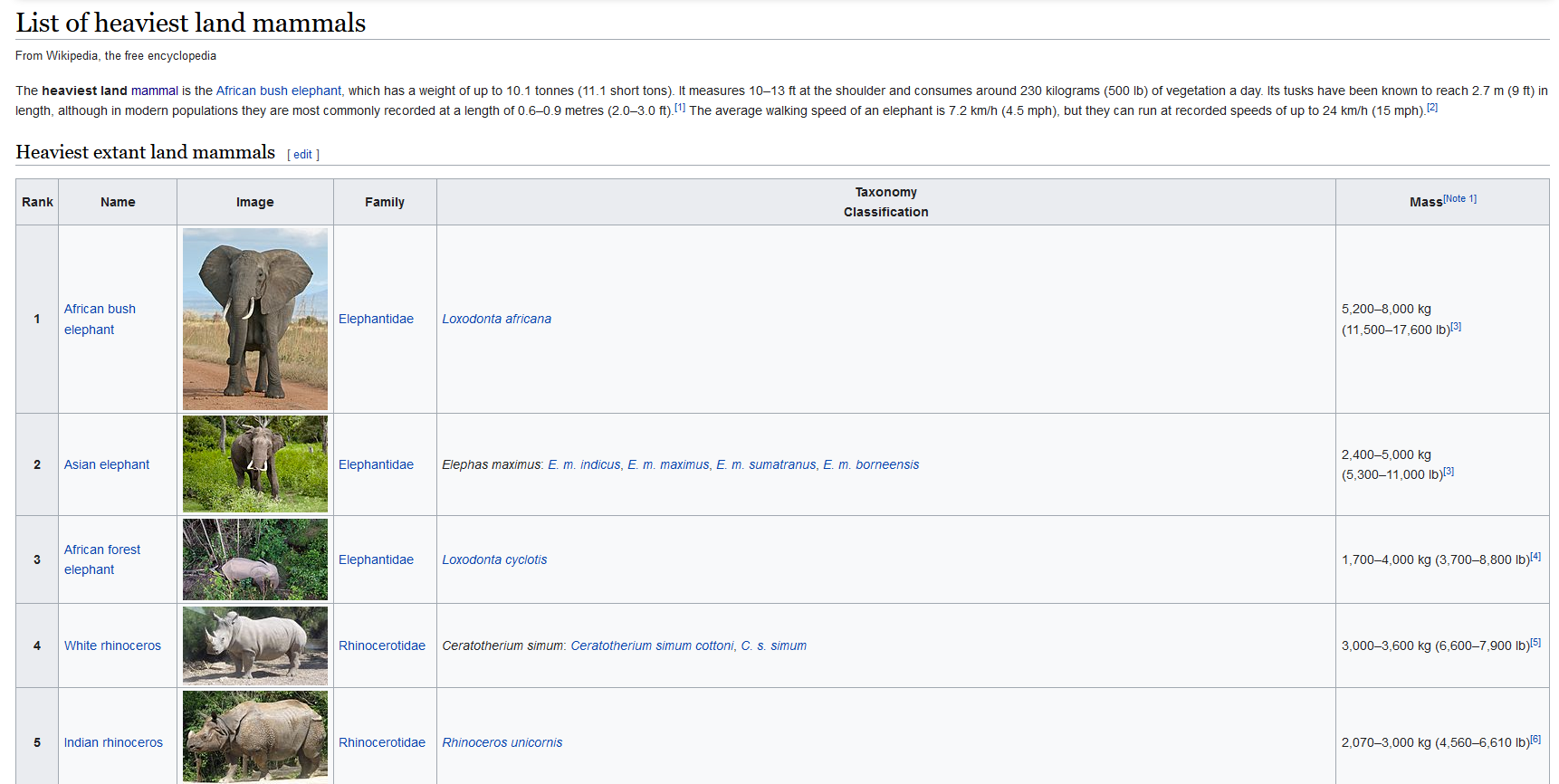
Which Python data types could you use in principle to collect …
… the names of the five heaviest mammals? Implement it in every possible data type. Write a program that outputs the first, the second and the fifth of the heaviest mammals.
… the names and the (maximum) mass of the mammals? Again, implement it in every possible data type and write a program that outputs the name and the maximum mass of the first, the second and the fifth heaviest mammal
mammals_names1 = ("African bush elephant", "Asian elephant", "African forest elephant", "White rhinoceros", "Indian rhinoceros")

mammals_names2 = ["African bush elephant", "Asian elephant", "African forest elephant", "White rhinoceros", "Indian rhinoceros"]

mammals_names3 = {'names': ["African bush elephant", "Asian elephant", "African forest elephant", "White rhinoceros", "Indian rhinoceros"]}

mammals_names1[0]
mammals_names1[1]
mammals_names1[4]

mammals_names3['names'][0]


# Manual index provision
for i in [0,1,4]:
    print(mammals_names1[i])

# Manual index provision
for i in [0,1,4]:
    print(mammals_names2[i])

# Short hand loop (one-liner) ("list comprehension")
print([mammals_names1[i] for i in [0,1,4]])
African bush elephant
Asian elephant
Indian rhinoceros
African bush elephant
Asian elephant
Indian rhinoceros
['African bush elephant', 'Asian elephant', 'Indian rhinoceros']mammals_mass1 = (8000, 5000, 4000, 3600, 3000)
mammals_mass2 = [8000, 5000, 4000, 3600, 3000]
# Nested tuple
mammals1 = (("African bush elephant",8000), ("Asian elephant", 5000), ("African forest elephant", 4000), ("White rhinoceros", 3600), ("Indian rhinoceros", 3000))
for i in [0,1,4]:
print(mammals1[i])
# Nested list
mammals2 = [["African bush elephant",8000], ["Asian elephant", 5000], ["African forest elephant", 4000], ["White rhinoceros", 3600], ["Indian rhinoceros", 3000]]
for i in [0,1,4]:
print(mammals2[i])
for i in range(0, len(mammals2), 2):
print(mammals2[i])
# Dictionary (with lists)
mammals3 = {"Name": mammals_names1,
"Mass": mammals_mass1}
mammals3.items()
mammals4 = {"African bush elephant" : 8000,
"Asian elephant" : 5000,
"African forest elephant" : 4000,
"White rhinoceros" : 3600,
"Indian rhinoceros": 3000
}
# doesn't work
# mammals4[0]
mammals4['African bush elephant']
list(mammals4.items())[0]
# List of dictionary
mammals_list_with_dict = []
for i in range(0, len(mammals2)):
a_dict = {"Name": mammals2[i][0], "Mass": mammals2[i][1]}
mammals_list_with_dict.append(a_dict)
print(mammals_list_with_dict)
# Dictionary from list
mammals_dict_from_list = {i : mammals2[i] for i in range(0, len(mammals2) ) }
for i in [0,1,4]:
print(mammals_dict_from_list[i])
mammals_dict_from_list2 = {mammals2[i][0] : mammals2[i][1] for i in range(0, len(mammals2) ) }
# getting list from dict
list(mammals4.keys())
# using dict()
mammals_dict_from_list3 = dict.fromkeys(mammals_names2, 0)
mammals_dict_from_list3['African bush elephant'] = 123 # or in loop
mammals_dict_from_list2 = dict(zip(mammals_names2, mammals_mass2))('African bush elephant', 8000)
('Asian elephant', 5000)
('Indian rhinoceros', 3000)
['African bush elephant', 8000]
['Asian elephant', 5000]
['Indian rhinoceros', 3000]
['African bush elephant', 8000]
['African forest elephant', 4000]
['Indian rhinoceros', 3000]
[{'Name': 'African bush elephant', 'Mass': 8000}, {'Name': 'Asian elephant', 'Mass': 5000}, {'Name': 'African forest elephant', 'Mass': 4000}, {'Name': 'White rhinoceros', 'Mass': 3600}, {'Name': 'Indian rhinoceros', 'Mass': 3000}]
['African bush elephant', 8000]
['Asian elephant', 5000]
['Indian rhinoceros', 3000]- Based on Part a), consider the following problems. Discuss/show whether and how you could solve them with the different data type implementations.
Consider the names of the heaviest mammals only. A researcher wants to sort the names of the heaviest animals according to their alphabetical order. Create a new list called
mammals_names_sorted. What happens do the original list of names, if you use Python’s.sort()method for lists?A new study reports the observation of a new species called “Giant Australian hamster” with a mass of 5000 kg. Insert this observation in your list. Hint: Use Python’s
.insert()method for lists.Now, consider the list of the mammals’ name and mass. A new study reports that an African bush elephant with a mass of 10000 kg has been observed. Update the list of heaviest mammals in the solutions from Part a) (if possible).
mammals_names_sorted = mammals_names2.copy()
mammals_names_sorted.sort()
print(mammals_names_sorted)
print(mammals_names2)
['African bush elephant', 'African forest elephant', 'Asian elephant', 'Indian rhinoceros', 'White rhinoceros']
['African bush elephant', 'Asian elephant', 'African forest elephant', 'White rhinoceros', 'Indian rhinoceros']# Sort lists and tuples with sorted()
mammals_names_sorted = sorted(mammals_names2)
print(mammals_names_sorted)['African bush elephant', 'African forest elephant', 'Asian elephant', 'Indian rhinoceros', 'White rhinoceros']mammals_names2.insert(1, "Giant Australian hamster")
print(mammals_names2)['African bush elephant', 'Giant Australian hamster', 'Asian elephant', 'African forest elephant', 'White rhinoceros', 'Indian rhinoceros']mammals2[0][1] = 10000
print(mammals2)
mammals2
# dictionary
mammals4['African bush elephant'] = 10000[['African bush elephant', 10000], ['Asian elephant', 5000], ['African forest elephant', 4000], ['White rhinoceros', 3600], ['Indian rhinoceros', 3000]]Exercise 4: Lists
- Given a list of integers (which you define in your code), output
“True”if the first and last number of the list are the same (else output“False”).
list1 = [1,23,4,123,2,3,5,6,2]
if (list1[0] == list1[-1]):
    print("True")
else:
print("False") False- Given a list of numbers (which you define in your code), print only those numbers that can be divided by 5 without residual.
list2 = [1,23,4,123,2,3,5,6,10]
for i in list2:
    if i%5 == 0:
        print(i)
5
10- Write a program that combines two lists by alternatingly taking elements, e.g.
["a","b","c"], [1,2,3] → ["a",1,"b",2,"c",3]
list4 = ['a','b','c']
list5 = [1,2,3]
list6 = []
for i in range(0,len(list5)):
    list6.append(list4[i])
    list6.append(list5[i])
print(len(list4))
print(len(list5))
print(len(list6))
print(list6)
3
3
6
['a', 1, 'b', 2, 'c', 3]- Let a small data set be \[5\ 2\ 11\ 19\ 6.\]
- Enter these numbers into a list
x_list. - Find the square of each number and enter these numbers into a list
x_square.
x_list = [5, 2, 11, 19, 6]
# empty list
x_square = [0]*len(x_list)
x_square

x_list=[5, 2, 11, 19, 6]
x_square = [0]*len(x_list)
for i in range(len(x_list)):
    x_square[i]=x_list[i]**2
print(x_square)

# Or short-hand notation
x_square2 = [i**2 for i in x_list]
[25, 4, 121, 361, 36]Exercise 5: Functions
- Write a function
comparethat returns the value- 1 if \(x>y\),
- 0 if \(x=y\) and
- -1 if \(x<y\).
The following program counts the number of times the letter “a” appears in a string
word="banana"
count=0
for letter in word:
    if letter == "a":
        count=count+1
print(count) 3Encapsulate the code above in a function named
count(w,l,s)that counts the number of times a letterlappears in a wordw. Additionally,sgives the index inwwhere it should start the search.Generate a random integer between 1 and 10. Write a guessing game where the user has to guess the secret number. After every guess, the program tells the user whether their number was too large or too small. At the end the number of tries needed should be printed.
- Hint: Use the function
randint()provided in therandommodule to randomly draw integers. Also useinput().
def compare(x,y):
    if x>y:
        return 1
    elif x==y:
        return 0
    else:
        return -1

compare(2,3)-1def count(w,l,s):
count=0
for letter in w[(s):len(w)]:
if letter == l:
count=count+1
return(count)
# Example
count('hello', 'l', 0) 2# Example for random integer with random
import random
random.randint(1,10)10import random
guess = 0
r = random.randint(1,10)
attempts = 1
while guess != r:
guess = input("Please guess!")
guess = int(guess)
if guess > r:
print ("Smaller!")
attempts+=1
if guess < r:
print("Bigger!")
attempts+=1
print (f"Great, you found the number ({r}) in {attempts} tries!")Section 2: Files, Modules and Classes
Exercise 1: Object Orientation
Mike and Jenny both have a car. Mike’s car is a Opel Manta, Jenny drives a Cadillac Escalade. Both collected data on their fuel stops in the last month.
- Mike’s record:
| Mileage1 | Amount of Gasoline |
|---|---|
| 1200 | |
| 2000 | 70 |
| 2250 | 22 |
- Jenny’s record:
| Mileage | Amount of Gasoline |
|---|---|
| 8200 | |
| 9400 | 80 |
| 10400 | 68 |
| 12000 | 110 |
Define a new object class
Carwhich represents a car in terms of the owner’s name (attributeowner), the model of the car (model), the mileage (kilometers) and amount of gasoline (gas) at the recorded fuel stops. Generate two new instances for Mike’s and Jenny’s car, assign attributes and access them using pythons’s dot notation.Implement a method
print_car()that describes the object in a message saying something like:"This is Mike's car. It is a Opel Manta.".Add a method
avg_consumption()that returns the average consumption (in liter per 100 kilometers) between the recorded fuel stops.Implement a new method
add_stop()that allows to add data from a new fuel stop, i.e., enter a new entry forkilometersandgas. Add a new fuel stop and check if it is successfully listed in the output of theavg_consumption()call.Generate a new class
Carpool(without any functionality) in which you encapsulate Mike’s and Jenny’s cars. Add a new stop to Mike’s record and see if the encapsulated object has changed. Explain why (not) and provide an example how you can avoid that your change is effective for the encapsulated object.
- Hint: Use
import copyto use the calldeepcopyfor generating a deep copy of a list.
- Consider the following objects and do the tasks below.
BobsCar = Car("Bob", "VW T1", [200000, 200100, 200300], [22, 40])
CarlsCar = Car("Carl", "Fiat Multipla", [179400, 183120, 183998], [89, 68])
MikesCar = Car("Mike", "Opel Manta", [1200, 2000, 2250], [70, 22])
JennysCar = Car("Jenny", "Cadillac Escalade", [8200, 9400, 10400, 12000], [80, 68, 110])

car_list = [MikesCar, JennysCar,  BobsCar, CarlsCar]
mixed_list = [MikesCar, BobsCar, 23, "abc"]- Sort all cars in
car_listaccording to the mileage (= maximum of entries in property.kilometers) starting with the largest value. - Based on
car_list, create two different lists one for cars with an average consumption below 10l/kilometer and one with the cars with 10l/kilometers and higher. - Get all objects of class
Carfrommixed_list. - (Optional: Implement the first two tasks in a method for the class
CarPool.)
# a)
## Object orientation:
class Car:
    """Represents a car in terms of total kilometers and fuels stops.

    attributes: kilometers, stop
    """

## Initialization
class Car:
    """Represents a car in terms of its owner, model, mileage and amount of
    gasoline at several fuel stops.

    attributes: owner, model, kilometers, stop
    """
    # initialization
    def __init__(self, owner, model, kilometers, gas):
        """Create a new instance of a car based on the car's owner, model, mileage and gas consumption."""
        self.owner = owner
        self.model = model
        self.kilometers = kilometers
        self.gas = gas
        print("Congratulation. You created a new Car!")

# Initialize
MikesCar = Car("Mike", "Opel Manta", [1200, 2000, 2250], [70, 22])
JennysCar = Car("Jenny", "Cadillac Escalade", [8200, 9400, 10400, 12000], [80, 68, 110])

# Access attributes
MikesCar.owner
MikesCar.model
MikesCar.kilometers
MikesCar.gas
Congratulation. You created a new Car!
Congratulation. You created a new Car![70, 22]# b)
# add print_car method
class Car:
"""Represents a car in terms of its owner, model, mileage and amount of
gasoline at several fuel stops.
attributes: owner, model, kilometers, stop
"""
# initialization
def __init__(self, owner, model, kilometers, gas):
"""Create a new instance of a car based on the car's owner, model, mileage and gas consumption."""
self.owner = owner
self.model = model
self.kilometers = kilometers
self.gas = gas
print("Congratulation. You created a new Car!")
def print_car(self):
"""Prints a description of a car."""
print(f"This is {self.owner}'s car. It is a {self.model}.")
# Comment: It is common to refer to a method that describes an object in a string as a "*string representation". In Python, the method name `__str__` is reserved for this method.# c)
# add avg_consumption method
class Car:
"""Represents a car in terms of its owner, model, mileage and amount of
gasoline at several fuel stops.
attributes: owner, model, kilometers, stop
"""
# initialization
def __init__(self, owner, model, kilometers, gas):
"""Create a new instance of a car based on the car's owner, model, mileage and gas consumption."""
self.owner = owner
self.model = model
self.kilometers = kilometers
self.gas = gas
print("Congratulation. You created a new Car!")
def print_car(self):
"""Prints a description of a car."""
print(f"This is {self.owner}'s car. It is a {self.model}.")
def add_stop(self, newmileage, newgas):
"""Add a new fuel stop with an entry on mileage and gas consumption."""
self.kilometers.append(newmileage)
self.gas.append(newgas)
print("A new fuel stop has been added.")
def avg_consumption(self):
"""Calculates the average fuel consumption (l/km) based on a car's gas and mileage."""
self.avg_l_per_km = []
for i in range(len(self.gas)):
this_l_per_km = self.gas[i]/(self.kilometers[i+1] - self.kilometers[i])*100
self.avg_l_per_km.append(this_l_per_km)
return(self.avg_l_per_km)# d)
class Car:
"""Represents a car in terms of its owner, model, mileage and amount of
gasoline at several fuel stops.
attributes: owner, model, kilometers, stop
"""
# initialization
def __init__(self, owner, model, kilometers, gas):
"""Create a new instance of a car based on the car's owner, model, mileage and gas consumption."""
self.owner = owner
self.model = model
self.kilometers = kilometers
self.gas = gas
print("Congratulation. You created a new Car!")
def print_car(self):
"""Prints a description of a car."""
print(f"This is {self.owner}'s car. It is a {self.model}.")
def avg_consumption(self):
"""Calculates the average fuel consumption (l/km) based on a car's gas and mileage."""
self.avg_l_per_km = []
for i in range(len(self.gas)):
this_l_per_km = self.gas[i]/(self.kilometers[i+1] - self.kilometers[i])*100
self.avg_l_per_km.append(this_l_per_km)
return(self.avg_l_per_km)
def add_stop(self, newmileage, newgas):
"""Add a new fuel stop with an entry on mileage and gas consumption."""
self.kilometers.append(newmileage)
self.gas.append(newgas)
print("A new fuel stop has been added.")class Car2(Car):
"""Extends Car by providing a max_mileage property."""
@property
def max_mileage(self):
"""The highest odometer reading."""
return max(self.kilometers)
@property
def avg_consumption(self):
"""Returns overall average consumption (L/100km) for the entire recorded mileage."""
total_distance = self.kilometers[-1] - self.kilometers[0]
total_gas = sum(self.gas)
return (total_gas / total_distance) * 100
# Instantiate Car objects
BobsCar = Car2("Bob", "VW T1", [200000, 200100, 200300], [22, 40])
CarlsCar = Car2("Carl", "Fiat Multipla", [179400, 183120, 183998], [89, 68])
MikesCar = Car2("Mike", "Opel Manta", [1200, 2000, 2250], [70, 22])
JennysCar = Car2("Jenny", "Cadillac Escalade", [8200, 9400, 10400, 12000], [80, 68, 110])
car_list = [MikesCar, JennysCar, BobsCar, CarlsCar]
mixed_list = [MikesCar, BobsCar, 23, "abc"]
# Task 1: Sort cars by maximum mileage (descending)
sorted_by_mileage = sorted(
car_list,
key=lambda car: car.max_mileage,
reverse=True
)
# Task 2: Partition cars by average consumption
low_consumption = [car for car in car_list if car.avg_consumption < 10]
high_consumption = [car for car in car_list if car.avg_consumption >= 10]
# Task 3: Filter only Car instances from mixed_list
only_cars = [item for item in mixed_list if isinstance(item, Car)]
# Optional: Implement CarPool
class CarPool:
def __init__(self, cars=None):
self.cars = cars or []
def sort_by_mileage(self, descending=True):
return sorted(
self.cars,
key=lambda car: car.max_mileage,
reverse=descending
)
def partition_by_consumption(self, threshold=10):
low = [car for car in self.cars if car.avg_consumption < threshold]
high = [car for car in self.cars if car.avg_consumption >= threshold]
return low, high
# Example usage
pool = CarPool(car_list)
print("Sorted by mileage:", [car.model for car in pool.sort_by_mileage()])
low, high = pool.partition_by_consumption()
print("Low consumption cars:", [car.model for car in low])
print("High consumption cars:", [car.model for car in high])
print("Filtered from mixed_list:", [car.model for car in only_cars])Congratulation. You created a new Car!
Congratulation. You created a new Car!
Congratulation. You created a new Car!
Congratulation. You created a new Car!
Sorted by mileage: ['VW T1', 'Fiat Multipla', 'Cadillac Escalade', 'Opel Manta']
Low consumption cars: ['Opel Manta', 'Cadillac Escalade', 'Fiat Multipla']
High consumption cars: ['VW T1']
Filtered from mixed_list: ['Opel Manta', 'VW T1']Exercise 2: Basic Calculations with the math module
Import the math module by
import mathUse Python as you would a calculator to find the numeric answers
- \(1+2(3+4)\)
- \(4^3+3^{2+1}\)
- \(\frac{1+2}{3+4}\)
- \(\sqrt{(4+3)(2+1)}\)
- \(\sin(\pi)+\cos(\pi)\)
- \(\exp(0) \log(2)\)
print(1+2*(3+4))
print(4**3+3**(2+1))
print((1+2)/(3+4))
print(math.sqrt((4+3)*(2+1)))
print(math.sin(math.pi)+math.cos(math.pi))
print(math.exp(0)*math.log(2))
15
91
0.42857142857142855
4.58257569495584
-0.9999999999999999
0.6931471805599453Section 3: NumPy
Exercise 1: Working with NumPy Arrays
- You recorded your car’s mileage at your last six fill-ups as
\[ 34332\ 34604\ 34828\ 35019\ 35273\ 35513\]
- Enter these numbers into the array
m_age. Calculate the amount of miles that was driven after each fill up and enter these numbers into the variable miles. How many values does this variable include? What is the average amount of miles?- Hint:
np.diff()
- Hint:
m_age = np.array([34332, 34604, 34828, 35019, 35273, 35513])

miles = np.diff(m_age)
print(miles)
print(len(miles))
print(np.mean(miles))
[272 224 191 254 240]
5
236.2- Your cell-phone bill varied the last year from month to month the following way
\[ 22\ 31\ 18\ 35\ 29 \ 32\ 19\ 23\ 23\ 25\ 20\ 33\]
What is the largest amount you spent in a month? What is the smallest?
Find the total amount and the average amount per month that you spent in the last year!
How many months was the amount greater than 30$?
Is it worth to enter into a flatrate (25$ per month) for the next year expecting on average the same bills?
bill = np.array([22,31,18,35,29,32,19,23,23,25,20,33])
print(np.max(bill))
print(np.min(bill))
print(np.sum(bill))
print(np.mean(bill))

print(bill > 30 )
print(np.sum(bill > 30))
np.sum(bill)-25*12
35
18
310
25.833333333333332
[False True False True False True False False False False False True]
4np.int64(10)Exercise 2: Linear Regression with NumPy
The linear regression (see lecture 2) is a basic concept in statistics. Consider the linear regression model \[
y_i = \beta_0 + \beta_1X_i + \varepsilon_i = \mathbf{X}_i^T \boldsymbol{\beta} + \varepsilon_i
\] One can estimate the coefficients \(\mathbf{\hat{\beta}}\) by solving the following matrix equation: \[
\boldsymbol{\hat{\beta}}=(\mathbf{X}^T\mathbf{X})^{-1}\mathbf{X}^T\mathbf{y}
\] Calculate \(\boldsymbol{\hat{\beta}}\) and the residuals \(\boldsymbol{\varepsilon} = \mathbf{y} - \mathbf{\hat{y}}\) using NumPy for the following small dataset.
| Shoe Size (\(X\)) | Height (\(y\)) |
|---|---|
| 36 | 170 |
| 37 | 175 |
| 38 | 180 |
| 38 | 169 |
| 40 | 190 |
- Hint: To have an intercept \(\hat{\beta}_0\) in the model, just add a full column of \(1\)s to your independent variable \(X\) to get your design matrix \(\mathbf{X}\) with
np.ones().
x_1 = np.array([36, 37, 38, 38, 40])
y = np.array([170, 175, 180, 169, 190])

X = np.vstack((np.ones(shape=x_1.shape), x_1)).T

beta_hat = np.matmul(np.matmul(np.linalg.inv(np.matmul(X.T, X)), X.T), y)
y_hat = np.matmul(X, beta_hat)
residuals = np.subtract(y, y_hat)

print(beta_hat[0]) # Intercept
print(beta_hat[1]) # Coefficient
print(residuals) # Residuals
-2.749999999993207
4.749999999999762
[ 1.75 2. 2.25 -8.75 2.75]Section 4: Pandas
Exercise 1: Pandas DataFrames
- M and M’s Example
A bag of the candy M and M’s has many different colors. The table in Figure 2 contains the targeted color distribution in a bag of M and M’s as percentages for various types of packaging.
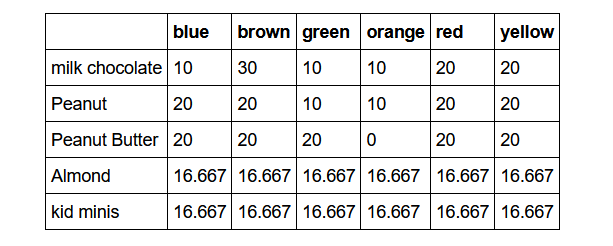
Enter this table into a pandas.DataFrame called mandms. Use pandas to answer the following questions:
Which packaging is missing one of the six colours?
Confirm that the color shares sum up to 100% for each package type.
- Hint:
DataFrame.sum()
- Hint:
Write a code that displays the colour that is most frequent!
- Hint:
DataFrame.sum()
- Hint:
import pandas as pd
A = np.array([[10,30, 10, 10, 20, 20 ],[20,20, 10, 10, 20, 20 ],
    [20,20, 20, 0, 20, 20 ],[16.667, 16.667, 16.667, 16.667, 16.667, 16.667 ],
    [16.667,16.667, 16.667, 16.667, 16.667, 16.667 ]])

namesr = ['MilkChoc','Peanut','PeanutButter','Almond','KidMinis']
namesc = ['blue','brown','green','orange','red','yellow']
mandms = pd.DataFrame(A, index=namesr, columns=namesc)
mandms| blue | brown | green | orange | red | yellow | |
|---|---|---|---|---|---|---|
| MilkChoc | 10.000 | 30.000 | 10.000 | 10.000 | 20.000 | 20.000 |
| Peanut | 20.000 | 20.000 | 10.000 | 10.000 | 20.000 | 20.000 |
| PeanutButter | 20.000 | 20.000 | 20.000 | 0.000 | 20.000 | 20.000 |
| Almond | 16.667 | 16.667 | 16.667 | 16.667 | 16.667 | 16.667 |
| KidMinis | 16.667 | 16.667 | 16.667 | 16.667 | 16.667 | 16.667 |
mandms = pd.DataFrame.from_dict({'MilkChoc': [10,30, 10, 10, 20, 20 ],
    'Peanut': [20,20, 10, 10, 20, 20 ],
    'PeanutButter': [20,20, 20, 0, 20, 20 ],
    'Almond': [16.667, 16.667, 16.667, 16.667, 16.667, 16.667 ],
    'KidMinis': [16.667,16.667, 16.667, 16.667, 16.667, 16.667 ]},
    orient='index', columns=['blue','brown','green','orange','red','yellow'])
# easy way
mandms == 0
missing = mandms.where(mandms==0)
print(missing)
mandms.where(mandms==0).dropna() blue brown green orange red yellow
MilkChoc NaN NaN NaN NaN NaN NaN
Peanut NaN NaN NaN NaN NaN NaN
PeanutButter NaN NaN NaN 0.0 NaN NaN
Almond NaN NaN NaN NaN NaN NaN
KidMinis NaN NaN NaN NaN NaN NaN| blue | brown | green | orange | red | yellow |
|---|
missing = mandms[mandms==0]
print(missing)
blue brown green orange red yellow
MilkChoc NaN NaN NaN NaN NaN NaN
Peanut NaN NaN NaN NaN NaN NaN
PeanutButter NaN NaN NaN 0.0 NaN NaN
Almond NaN NaN NaN NaN NaN NaN
KidMinis NaN NaN NaN NaN NaN NaNmissing.dropna(axis = 0, how = 'all')| blue | brown | green | orange | red | yellow | |
|---|---|---|---|---|---|---|
| PeanutButter | NaN | NaN | NaN | 0.0 | NaN | NaN |
missing.dropna(axis = 0, how = 'all').index[0]'PeanutButter'mandms.sum(axis = 1)MilkChoc 100.000
Peanut 100.000
PeanutButter 100.000
Almond 100.002
KidMinis 100.002
dtype: float64S = mandms.sum(axis=0)
print(S)blue 83.334
brown 103.334
green 73.334
orange 53.334
red 93.334
yellow 93.334
dtype: float64maxmandms = S[S == S.max()]
print(maxmandms.index[0])brown- Brain size data set
Download and load the brain_size.csv data set from STiNE. The dataset contains a small sample of observations of features (like gender, weight, height and three different IQ-measures) for different individuals.
import pandas as pd
brain_size = pd.read_csv('https://raw.githubusercontent.com/JanTeichertKluge/data-statprog/refs/heads/main/data/brain_size.csv', sep=';', na_values=".")
brain_size.head()| Unnamed: 0 | Gender | FSIQ | VIQ | PIQ | Weight | Height | MRI_Count | |
|---|---|---|---|---|---|---|---|---|
| 0 | 1 | Female | 133 | 132 | 124 | 118.0 | 64.5 | 816932 |
| 1 | 2 | Male | 140 | 150 | 124 | NaN | 72.5 | 1001121 |
| 2 | 3 | Male | 139 | 123 | 150 | 143.0 | 73.3 | 1038437 |
| 3 | 4 | Male | 133 | 129 | 128 | 172.0 | 68.8 | 965353 |
| 4 | 5 | Female | 137 | 132 | 134 | 147.0 | 65.0 | 951545 |
Before we perform some analysis, we will do some preprocessing.
Load the data set and drop the column
Unnamed: 0.Use
DataFrame.dropna()to clean your data from entries containingNaNvalues. How many observations are left after the data cleaning?
Calculate the following descriptive statistics.
How many observations/individuals do we have?
Calculate the means and standard deviations for VIQ, Weight and Height. What is the median of Weight?
What is the percentage of women in the data set?
As a primitive approach to determine whether there are differences based on gender, calculate the means of the features above, again conditioned on gender.
brain_size.drop(['Unnamed: 0'], axis = 1, inplace=True)print(brain_size.shape)
brain_size.dropna(inplace = True)
print(brain_size.shape)(40, 7)
(38, 7)print(brain_size['Weight'].mean())
print(brain_size['VIQ'].mean())
print(brain_size.loc[:,'VIQ'].mean())
print(brain_size.loc[:,'VIQ'].mean())
print(brain_size['VIQ'].std())
print(brain_size['Weight'].mean())
print(brain_size['Weight'].std())
print(brain_size['Height'].mean())
print(brain_size['Height'].std())151.05263157894737
112.13157894736842
112.13157894736842
112.13157894736842
22.939604667570226
151.05263157894737
23.478509286005146
68.42105263157895
3.993789631262101brain_size.describe()| FSIQ | VIQ | PIQ | Weight | Height | MRI_Count | |
|---|---|---|---|---|---|---|
| count | 38.000000 | 38.000000 | 38.000000 | 38.000000 | 38.000000 | 3.800000e+01 |
| mean | 113.552632 | 112.131579 | 111.342105 | 151.052632 | 68.421053 | 9.067542e+05 |
| std | 23.815391 | 22.939605 | 22.597867 | 23.478509 | 3.993790 | 7.256175e+04 |
| min | 77.000000 | 71.000000 | 72.000000 | 106.000000 | 62.000000 | 7.906190e+05 |
| 25% | 90.250000 | 90.250000 | 89.250000 | 135.250000 | 66.000000 | 8.548115e+05 |
| 50% | 116.500000 | 113.000000 | 115.000000 | 146.500000 | 68.000000 | 9.053990e+05 |
| 75% | 135.000000 | 129.000000 | 128.000000 | 172.000000 | 70.375000 | 9.495405e+05 |
| max | 144.000000 | 150.000000 | 150.000000 | 192.000000 | 77.000000 | 1.079549e+06 |
print(brain_size['Weight'].median())146.5print(np.sum(brain_size["Gender"]=="Female"))
print(np.sum(brain_size["Gender"]=="Male"))
brain_size.groupby('Gender').mean()
brain_size.groupby('Gender').agg('mean')20
18| FSIQ | VIQ | PIQ | Weight | Height | MRI_Count | |
|---|---|---|---|---|---|---|
| Gender | ||||||
| Female | 111.900000 | 109.450000 | 110.450000 | 137.200000 | 65.765000 | 862654.600000 |
| Male | 115.388889 | 115.111111 | 112.333333 | 166.444444 | 71.372222 | 955753.722222 |
brain_size.groupby('Gender').mean().diff(axis = 0).dropna()

brain_size.groupby('Gender').agg('mean').diff(axis = 0).dropna()| FSIQ | VIQ | PIQ | Weight | Height | MRI_Count | |
|---|---|---|---|---|---|---|
| Gender | ||||||
| Male | 3.488889 | 5.661111 | 1.883333 | 29.244444 | 5.607222 | 93099.122222 |
Section 5: Data Visualization
Exercise 1: Basic visualization with matplotlib and seaborn
In this exercise, we will visualize data from a cosinus function. To do so, set up data for a variable x with np.linspace, on which you apply the cosinus function.
Create a scatter plot with
matplotlib.Create a line plot with
seaborn.Add a sinus function to the graph in
matplotlib.Add a sinus function to the graph in
seabornvia a dashed line.Create a random variable that simulates a coin flip. Use the information according to the coin flip to provide a color argument to the scatter plot in
matplotlib.Put the four different figures as subfigures into one major figure. Save the figure in a file
my_plot.png.
# Step 1: imports
import numpy as np
import matplotlib.pyplot as plt

# Step 2: Generate the data for variable x
x = np.linspace(0, 2*np.pi, 100)

# Step 3: Apply the cosine function to x
y = np.cos(x)

# Step 4: Create a scatter plot using matplotlib
plt.scatter(x, y)
plt.xlabel('x')
plt.ylabel('y')
plt.title('Scatter Plot')

# Step 5: Show the plots
plt.show()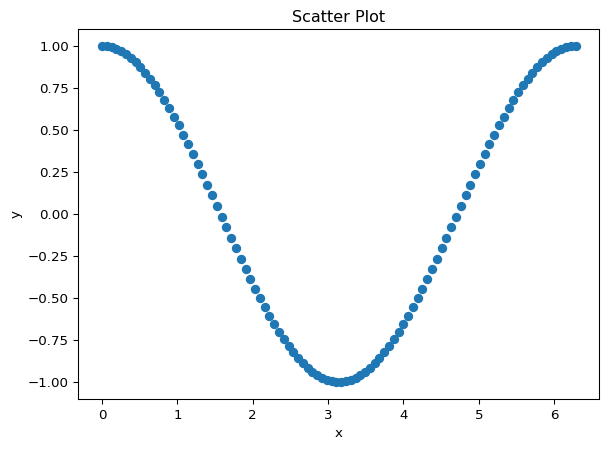
import pandas as pd
import seaborn as sns

# data types for seaborn
# https://seaborn.pydata.org/tutorial/data_structure.html

# Step 1: Generate the data for variable x
x = np.linspace(0, 2*np.pi, 100)

# Step 2: Apply the cosine function to x
y = np.cos(x)

# Step 3: Create a line plot using seaborn
df_plot = pd.DataFrame({'x': x, 'y': y})
sns.lineplot(df_plot, x = 'x', y = 'y')
plt.xlabel('x')
plt.ylabel('y')
plt.title('Line Plot')

# Step 4: Show the plot
plt.show()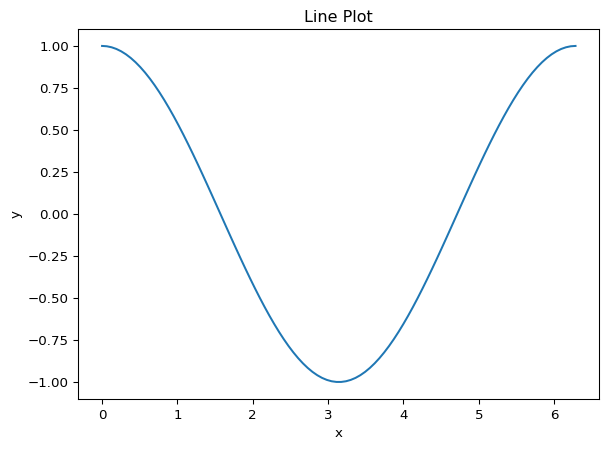
# Step 1: imports
import numpy as np
import matplotlib.pyplot as plt

# Step 2: Generate the data for variable x
x = np.linspace(0, 2*np.pi, 100)

# Step 3: Apply the cosine function to x
y = np.cos(x)
z = np.sin(x)

# Step 4: Create a scatter plot using matplotlib
plt.scatter(x, y)
plt.scatter(x, z)
plt.xlabel('x')
plt.ylabel('y')
plt.title('Scatter Plot')
plt.show()

# Step 5: Show the plots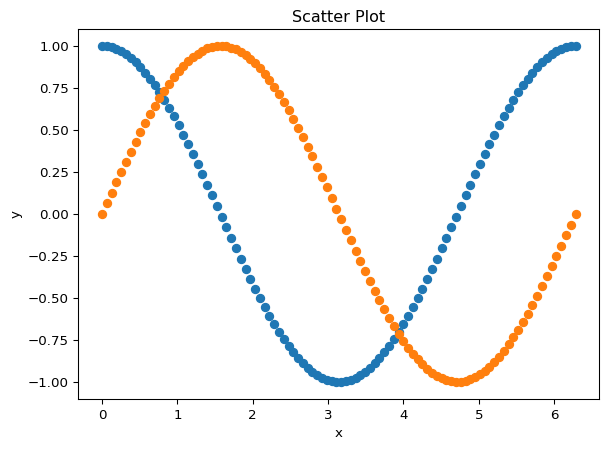
np.random.seed(123)

coin_flip_color = np.random.choice(['red', 'blue'], 100)

# Step 1: imports
import numpy as np
import matplotlib.pyplot as plt

# Step 2: Generate the data for variable x
x = np.linspace(0, 2*np.pi, 100)

# Step 3: Apply the cosine function to x
y = np.cos(x)
z = np.sin(x)

# Step 4: Create a scatter plot using matplotlib
plt.scatter(x, y, color = coin_flip_color)
plt.scatter(x, z, color = coin_flip_color)
plt.xlabel('x')
plt.ylabel('y')
plt.title('Scatter Plot')

# Step 5: Show the plots
plt.show()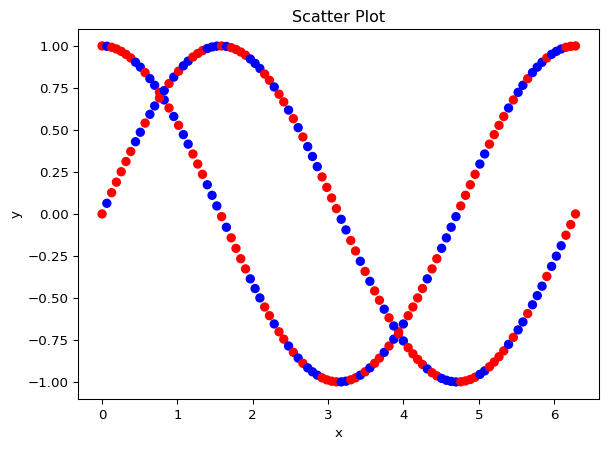
import numpy as np
import matplotlib.pyplot as plt

# Step 2: Generate the data for variable x
x = np.linspace(0, 2*np.pi, 100)

# Step 3: Apply the cosine function to x
y = np.cos(x)
z = np.sin(x)

df = pd.DataFrame({'x': x, 'y': y, 'z': z, 'coin_flip': coin_flip_color})

# Step 4: Create a scatter plot using matplotlib
sns.scatterplot(df, x = 'x', y = 'y', hue = 'coin_flip')
plt.xlabel('x')
plt.ylabel('y')
plt.title('Scatter Plot with coin flip')

# Step 5: Show the plots
plt.show()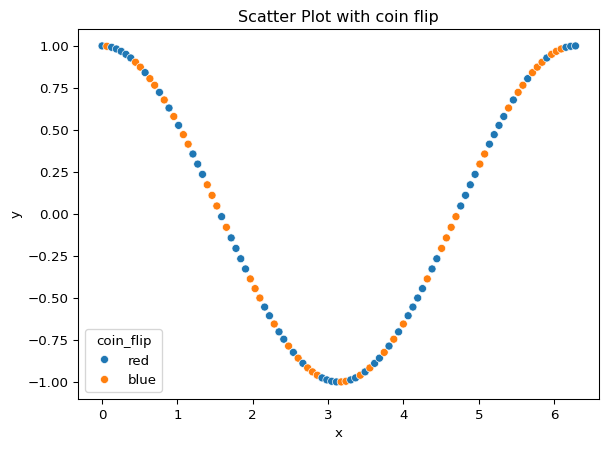
import seaborn as sns

# Step 1: Generate the data for variable x
x = np.linspace(0, 2*np.pi, 100)

# Step 2: Apply the cosine function to x
y = np.cos(x)
z = np.sin(x)


# Step 3: Create a line plot using seaborn
df_plot = pd.DataFrame({'x': x, 'y': y, 'z': z, 'coin_flip': coin_flip_color})
sns.lineplot(df_plot, x = 'x', y = 'y')
sns.lineplot(df_plot, x = 'x', y = 'z', linestyle = '--')
plt.xlabel('x')
plt.ylabel('y')
plt.title('Line Plot')

# Step 4: Show the plot
plt.show()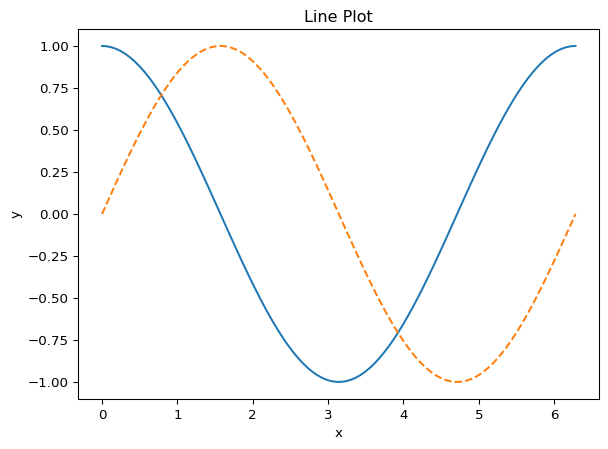
# %%
# Subfigures in matplotlib: https://matplotlib.org/stable/gallery/subplots_axes_and_figures/subfigures.html
# https://matplotlib.org/stable/gallery/subplots_axes_and_figures/subplots_demo.html
import matplotlib.pyplot as plt

# Create the figure and subplots
fig, axs = plt.subplots(2, 2, figsize=(10, 8))

# Set the title for each subplot
# Comment: You can do this in a loop too!
axs[0, 0].set_title("Scatter plot matplotlib")
axs[0, 1].set_title("Line plot seaborn")
axs[1, 0].set_title("Colored scatter plot matplotlib")
axs[1, 1].set_title("Cosine and Sine line plot seaborn")

# Scatter plot
axs[0, 0].scatter(x, y)
axs[0, 0].set_xlabel('X')
axs[0, 0].set_ylabel('Y')

# Lineplot plot seaborn
df = pd.DataFrame({'x' : x, 'cosinus' : y})
sns.lineplot(df, x = 'x', y = 'cosinus', ax=axs[0, 1])

# Colored scatter plot
axs[1,0].scatter(x, y, color = coin_flip_color)
axs[1,0].set_xlabel('x')
axs[1,0].set_ylabel('y')
axs[1,0].set_title('Scatter Plot')

# Cosine and sinus with seaborn
df = pd.DataFrame({'x' : x, 'cosinus' : y,
                   'sinus': z}).set_index("x")
sns.lineplot(data=df, ax=axs[1, 1])

# Adjust the spacing between subplots
plt.tight_layout()

# Show the figure
plt.show()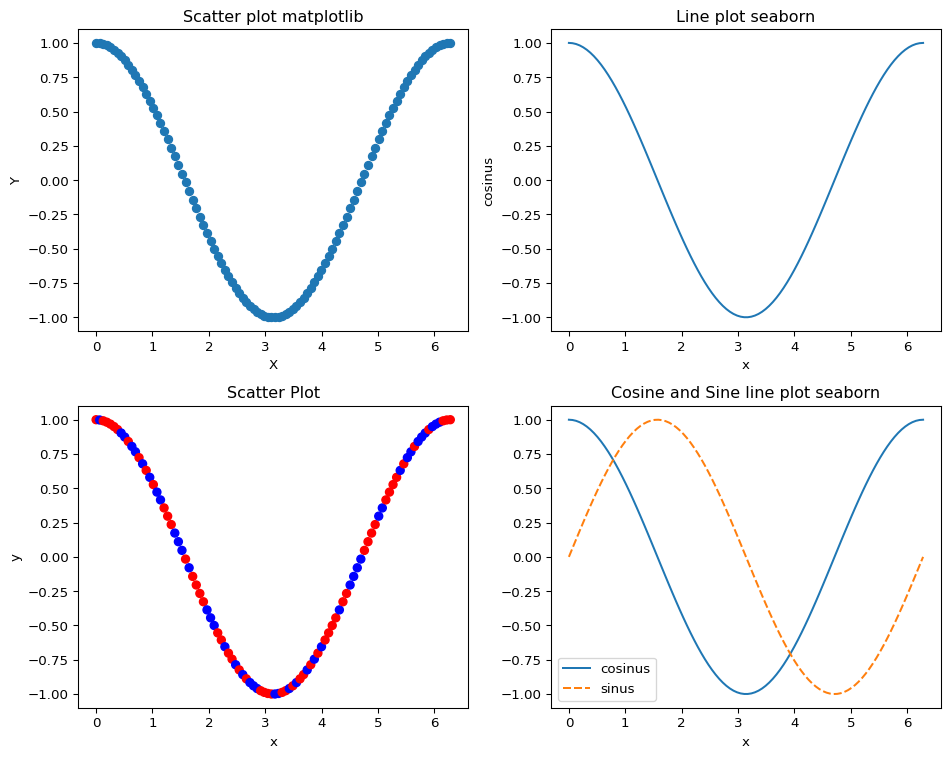
Exercise 2: Times University Ranking Data
Load the Times University Ranking Data, which collects data on a ranking of international universities. You can download a zip archive with the data from STiNE. Download and unpack the zip file and load the file timesData.csv.
file_path = "https://raw.githubusercontent.com/JanTeichertKluge/data-statprog/refs/heads/main/data/timesData.csv"
import pandas as pd
df_times = pd.read_csv(file_path)
Open the data set with
pandasand have a look at the very first rows. What do you see?What has been the best university from Germany in 2016? What is its rank?
df_times[(df_times['country'] == 'Germany') & (df_times['year'] == 2016)].sort_values(by = 'total_score', ascending = False).head(5)| world_rank | university_name | country | teaching | international | research | citations | income | total_score | num_students | student_staff_ratio | international_students | female_male_ratio | year | |
|---|---|---|---|---|---|---|---|---|---|---|---|---|---|---|
| 1831 | 29 | LMU Munich | Germany | 70.5 | 62.8 | 77.4 | 85.7 | 100.0 | 77.3 | 35,691 | 15.5 | 13% | 62 : 38 | 2016 |
| 1839 | 37 | Heidelberg University | Germany | 68.8 | 62.8 | 69.6 | 88.2 | 68.2 | 74.4 | 28,881 | 24.5 | 17% | 55 : 45 | 2016 |
| 1851 | 49 | Humboldt University of Berlin | Germany | 63.7 | 62.6 | 77.0 | 73.6 | 36.1 | 69.9 | 29,987 | 52.5 | 16% | NaN | 2016 |
| 1855 | 53 | Technical University of Munich | Germany | 61.0 | 63.8 | 66.0 | 80.1 | 99.2 | 69.4 | 35,565 | 31.5 | 20% | 33 : 67 | 2016 |
| 1874 | 72 | Free University of Berlin | Germany | 57.9 | 69.2 | 72.2 | 60.2 | 35.1 | 63.2 | 33,062 | 39.3 | 20% | 58 : 42 | 2016 |
How has the university’s ranking changed over time? Create a scatter plot that shows the development of the university’s ranking over time.
Create a graphic that shows the changes in terms of the variables
international,research,citation,incomeandtotal_scorefor this university over time.Modify the graphics in a way you like. Can you make them interactive with
plotlyorbokeh? Create your own visualization as based on the Times Data set.
df_lmu = df_times[df_times['university_name'] == "LMU Munich"]
df_lmu[['year', 'world_rank']].sort_values(by = 'year')
# Pandas built-in plotting
df_lmu.plot(x = 'year', y = 'world_rank', kind = 'scatter')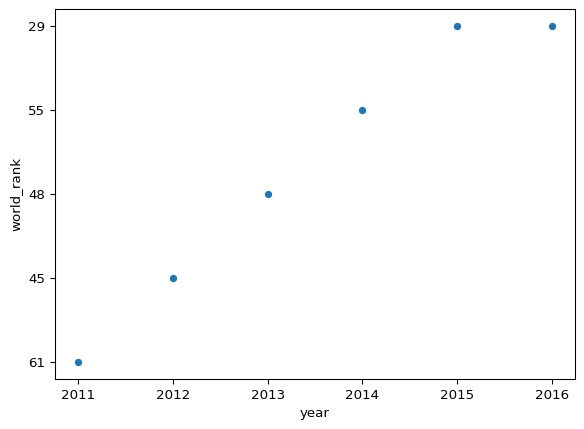
import seaborn as sns
sns.scatterplot(df_lmu, x = 'year', y = 'world_rank')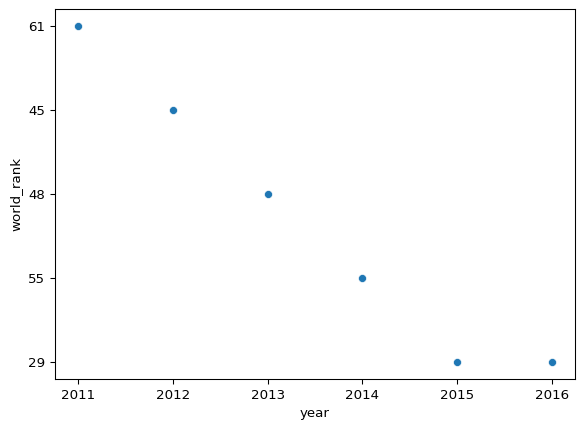
import matplotlib.pyplot as plt

df_lmu_details = df_lmu.loc[:, ['year', 'international', 'research', 'citations', 'income', 'total_score', 'world_rank']]

# Create a figure with subplots
fig, axes = plt.subplots(nrows=3, ncols=2, figsize=(10, 10))

# Generate scatter plots for each column
sns.scatterplot(data=df_lmu_details, x="year", y="international", ax=axes[0, 0])
sns.scatterplot(data=df_lmu_details, x="year", y="research", ax=axes[0, 1])
sns.scatterplot(data=df_lmu_details, x="year", y="citations", ax=axes[1, 0])
sns.scatterplot(data=df_lmu_details, x="year", y="income", ax=axes[1, 1])
sns.scatterplot(data=df_lmu_details, x="year", y="total_score", ax=axes[2, 0])
sns.scatterplot(data=df_lmu_details, x="year", y="world_rank", ax=axes[2, 1])

# Set titles and labels
axes[0, 0].set_title("International")
axes[0, 1].set_title("Research")
axes[1, 0].set_title("Citations")
axes[1, 1].set_title("Income")
axes[2, 0].set_title("Total Score")
axes[2, 1].set_title("World Rank")

# Adjust spacing between subplots
plt.tight_layout()

# Show the plot
plt.show()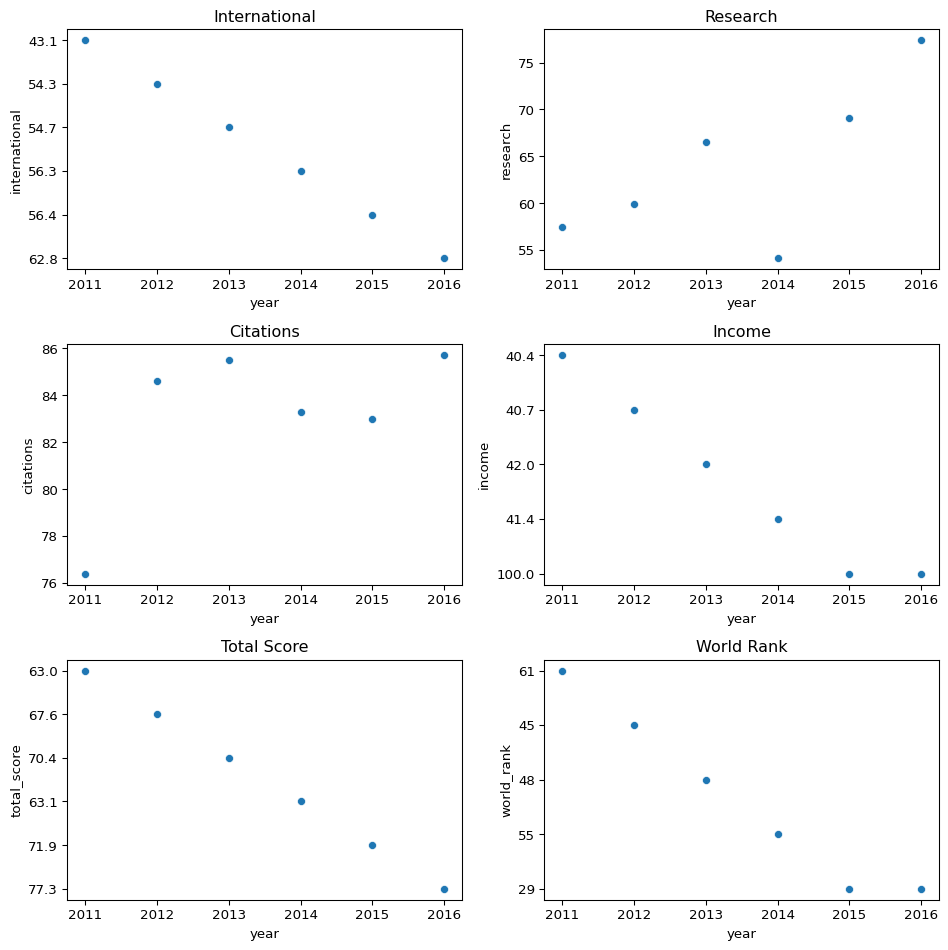
Footnotes
Mileage denotes the total number of kilometers driven with a car. The first value is the number of kilometers at the last fuel stop before record.↩︎