Explain in your own words how the Support Vector Machines work. You do not need to provide a mathematical description, an explanation of the basic theory is fine. Explain the usage of slack variables. Why do we need them?
Compare SVMs to Logistic Regression. How do they differ?
Solution
Explain in your own words
Support Vector Machines (SVMs) are a class of supervised learning algorithms used for classification and regression tasks. They work by finding the optimal hyperplane that separates different classes in the feature space. The key idea is to maximize the margin between the nearest data points of the different classes, known as support vectors.
In a nutshell, SVMs aim to find the best possible line (or hyperplane in higher dimensions) that divides data points into classes. This line should be positioned in such a way that it maximizes the distance between the nearest data points of each class, thus creating a wide margin. This wide margin helps in generalizing the classification to new, unseen data points.
For datasets that are linearly separable, SVMs identify the hyperplane that perfectly separates the classes. However, in real-world scenarios where data may not be perfectly separable, SVMs introduce the concept of slack variables, which allow for some misclassification. This is known as the soft-margin approach, where the algorithm seeks to find a balance between maximizing the margin and minimizing misclassification errors.
One of the remarkable features of SVMs is the kernel trick, which allows them to handle non-linear relationships between features. By implicitly mapping the input data into a higher-dimensional feature space, SVMs can effectively find linear separation boundaries in this transformed space. This is achieved through kernel functions, which compute the inner product between transformed feature vectors. Popular kernel functions include polynomial kernels and radial basis function kernels.
In summary, SVMs offer a powerful framework for classification tasks by finding the optimal hyperplane that separates different classes, with the flexibility to handle both linear and non-linear relationships between features.
Compare the SVM to the Logistic Regression
Logistic regression was discussed in the lecture. Compare the SVM just presented with the logistic regression and give at least 2 differences between them.
Solution
Logistic Regression
Logistic Regression, also known as logit models, is another popular classification algorithm. Unlike SVMs, which aim to find the maximum margin hyperplane, Logistic Regression models the probability of belonging to a particular class using a logistic function.
Differences
Decision Boundary: SVMs aim to find the hyperplane with the maximum margin, while Logistic Regression models the probability directly, resulting in a linear decision boundary.
Nonlinearity: SVMs can handle nonlinear relationships through the kernel trick, whereas Logistic Regression assumes a linear relationship between features and the log-odds of the target variable.
Interpretability: Logistic regression provides probabilities for each class, making it more interpretable in terms of likelihoods, while SVM provides a clear separation boundary.
Exercise 2: Logistic Regression
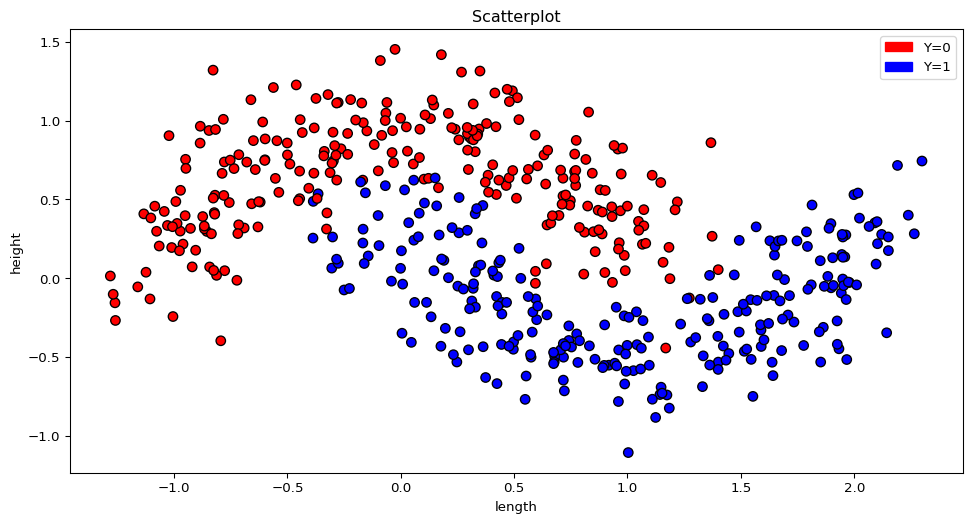
Now load the first classification_1 dataset. The data consist of two features and a classification variable.
How many different classes are contained in the dataset? (Hint: help(pd.unique))
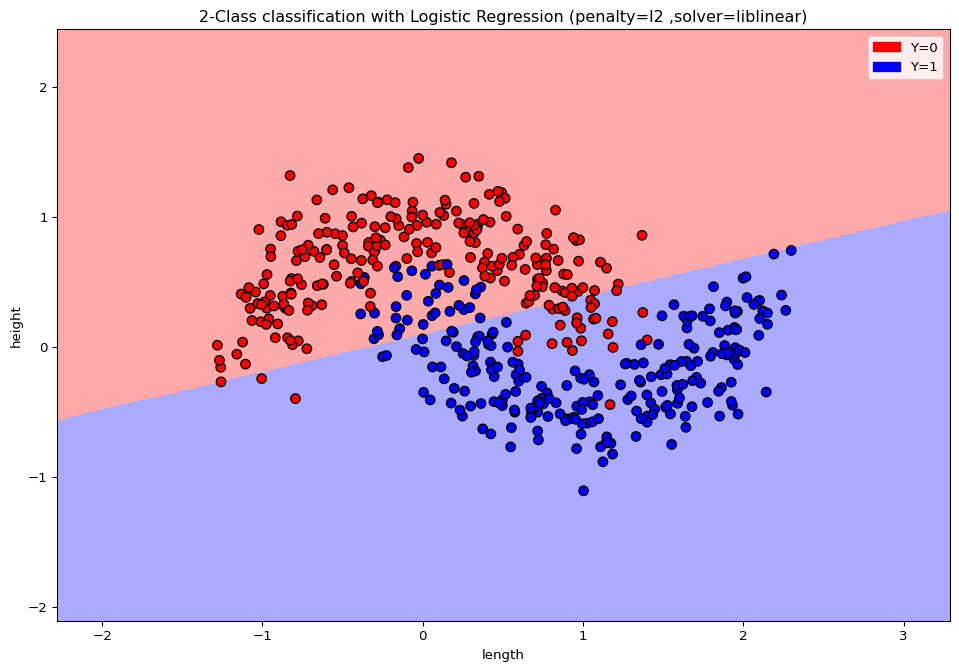
Use logistic regression to separate both classes and measure the error rate on the training set.
Try to visualize the data with matplotlib. Can you explain the results from the logistic regression?
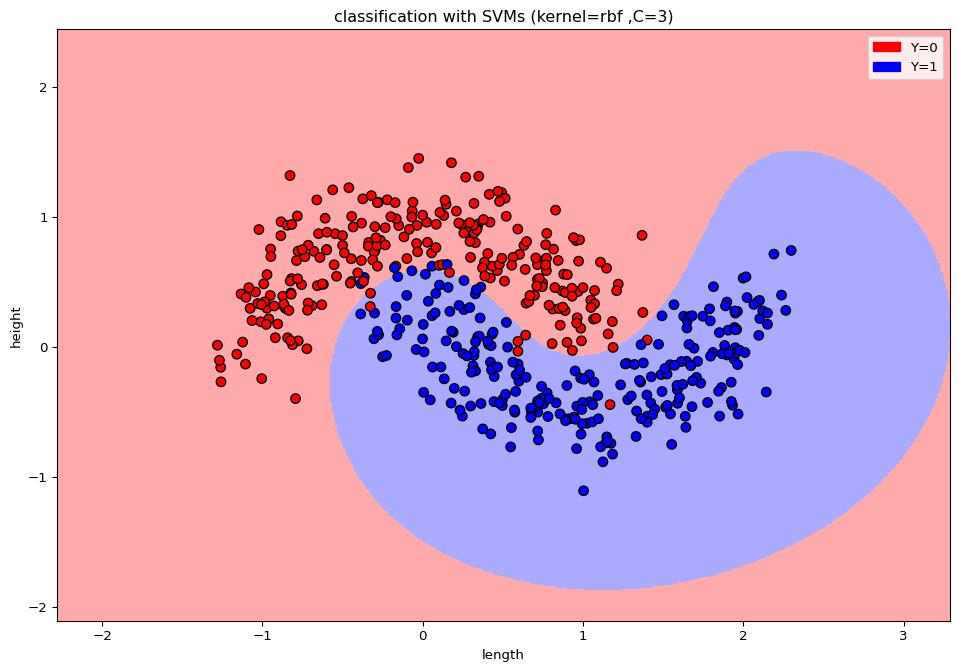
Which method could be better suited for this task? Try to improve on the error rate.
Solution:
import pandas as pdimport numpy as npdata = pd.read_csv('https://raw.githubusercontent.com/JanTeichertKluge/data-statprog/refs/heads/main/data/classification_1.csv', sep=';', na_values=".")data.head()
/home/runner/work/Statistical-Programming/Statistical-Programming/.venv/lib/python3.11/site-packages/sklearn/linear_model/_logistic.py:1135: FutureWarning:

'penalty' was deprecated in version 1.8 and will be removed in 1.10. To avoid this warning, leave 'penalty' set to its default value and use 'l1_ratio' or 'C' instead. Use l1_ratio=0 instead of penalty='l2', l1_ratio=1 instead of penalty='l1', and C=np.inf instead of penalty=None.
import matplotlib.cm as cmfrom matplotlib.colors import ListedColormap, BoundaryNormimport matplotlib.patches as mpatchesY = ypen ='l2'solv ='liblinear'# Create color mapscmap_light = ListedColormap(['#FFAAAA', '#AAAAFF'])cmap_bold = ListedColormap(['#FF0000', '#0000FF'])# Plot the decision boundary by assigning a color in the color map to each mesh point.mesh_step_size =.01# step size in the meshplot_symbol_size =50x_min, x_max = X[:, 0].min() -1, X[:, 0].max() +1y_min, y_max = X[:, 1].min() -1, X[:, 1].max() +1xx, yy = np.meshgrid(np.arange(x_min, x_max, mesh_step_size), np.arange(y_min, y_max, mesh_step_size))Z = model.predict(np.c_[xx.ravel(), yy.ravel()])# Put the result into a color plotZ = Z.reshape(xx.shape)plt.figure(3,figsize=(12,8))plt.pcolormesh(xx, yy, Z, cmap=cmap_light)# Plot training pointsplt.scatter(X[:, 0], X[:, 1], s=plot_symbol_size, c=Y, cmap=cmap_bold, edgecolor ='black')plt.xlim(xx.min(), xx.max())plt.ylim(yy.min(), yy.max())patch0 = mpatches.Patch(color='#FF0000', label='Y=0')patch1 = mpatches.Patch(color='#0000FF', label='Y=1')plt.legend(handles=[patch0, patch1])plt.xlabel('length')plt.ylabel('height')plt.title("2-Class classification with Logistic Regression (penalty=%s ,solver=%s)"% (pen, solv)) plt.show()
/home/runner/work/Statistical-Programming/Statistical-Programming/.venv/lib/python3.11/site-packages/IPython/core/pylabtools.py:170: UserWarning:

Creating legend with loc="best" can be slow with large amounts of data.
Logistic regression is a linear classifier. Hence the two classes can not be separated. (obige Grafik als Veranschaulichung)
from sklearn import svmsupvecma = svm.SVC(kernel ='rbf', C =3)model = supvecma.fit(X, Y)print('Error rate:', np.mean(np.not_equal(model.predict(X),y)))
Error rate: 0.03
import matplotlib.cm as cmfrom matplotlib.colors import ListedColormap, BoundaryNormimport matplotlib.patches as mpatchesY = y# Create color mapscmap_light = ListedColormap(['#FFAAAA', '#AAAAFF'])cmap_bold = ListedColormap(['#FF0000', '#0000FF'])# Plot the decision boundary by assigning a color in the color map to each mesh point.mesh_step_size =.01# step size in the meshplot_symbol_size =50x_min, x_max = X[:, 0].min() -1, X[:, 0].max() +1y_min, y_max = X[:, 1].min() -1, X[:, 1].max() +1xx, yy = np.meshgrid(np.arange(x_min, x_max, mesh_step_size), np.arange(y_min, y_max, mesh_step_size))Z = model.predict(np.c_[xx.ravel(), yy.ravel()])# Put the result into a color plotZ = Z.reshape(xx.shape)plt.figure(3,figsize=(12,8))plt.pcolormesh(xx, yy, Z, cmap=cmap_light)# Plot training pointsplt.scatter(X[:, 0], X[:, 1], s=plot_symbol_size, c=Y, cmap=cmap_bold, edgecolor ='black')plt.xlim(xx.min(), xx.max())plt.ylim(yy.min(), yy.max())patch0 = mpatches.Patch(color='#FF0000', label='Y=0')patch1 = mpatches.Patch(color='#0000FF', label='Y=1')plt.legend(handles=[patch0, patch1])plt.xlabel('length')plt.ylabel('height')plt.title("classification with SVMs (kernel=rbf ,C=3)" ) plt.show()
Exercise 3: Wine classification
Now load the wine dataset. The dataset contains information on the chemical composition of wines. You can load the data via
from sklearn.datasets import load_winedataset = load_wine()
Make yourself familiar with the data. How many different wine types are contained in the sample? How many different features and observations are included?
Use the train_test_split function (test_size = 0.2, random_state=0) to split your your data into a training and a testing sample.
Try to classify your data with the \(k\)-nearest neighbor classification. Use different weights and number of neighbors to minimize your empirical error rate.
Try to improve on you result by using random forests.
Can you try to determine two of the most important features(determined by the attribute .feature_importances_ ) that can be used to seperate the results?
Solution
import pandas as pdimport numpy as npfrom sklearn.datasets import load_winedataset = load_wine()df = pd.DataFrame(dataset.data, columns=dataset.feature_names)df['Type'] = dataset.targetdf.head()
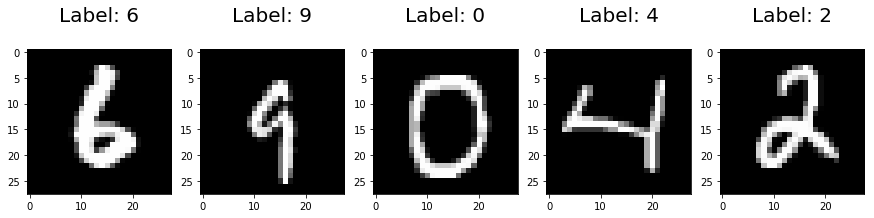
The (famous) MNIST dataset contains 70.000 observations of an image of a handwritten digit. Each observation consists \(784\) features (grey level) which correspond to a \(28\times28\) image. The MNIST data set is very popular to train and test algorithms in machine learning (see http://yann.lecun.com/exdb/mnist/ )
Example, MNIST.
Due to time constraints we process the just a subset with a reduced number of features. At first load the digits datastet.